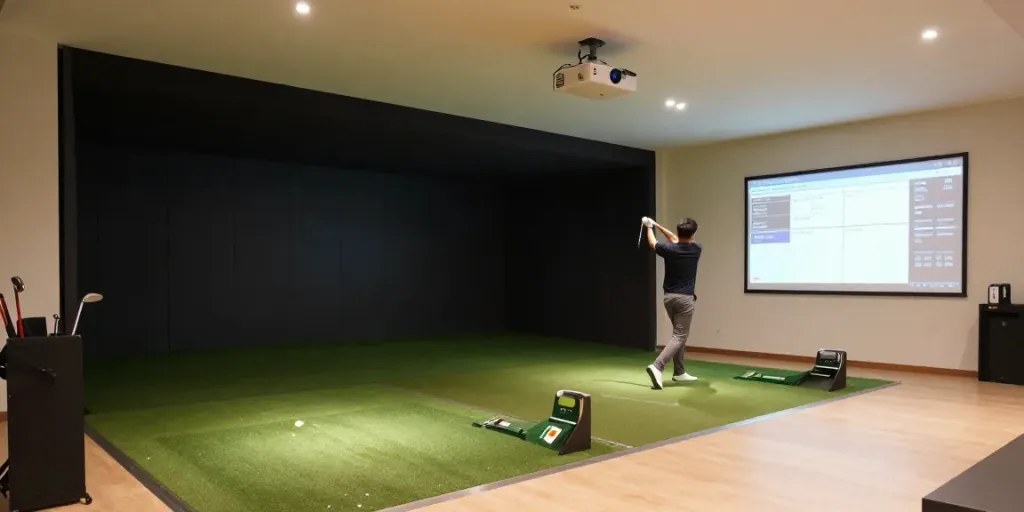
Understanding the Basics of Building a Home Golf Simulator
In the age of indoor golf technology, creating a home golf simulator has never been more appealing. Whether you are a seasoned golfer or a beginner looking to improve your swing, the prospect of practicing in the comfort of your home can save both time and money. But is it really worth the investment compared to traditional range memberships or indoor facilities? This guide will delve into how to build home golf sim setups that fit your space, needs, and budget.
What You Need to Get Started
Before you jump into purchasing high-end equipment, it's crucial to evaluate your available space and how you plan to use the simulator. You will need to consider key components such as the launch monitor, impact screen, or net, and the PC or device for software. These elements will determine not just your setup's cost, but also its functionality and enjoyment.
Evaluating Your Space: Dimensions and Setup
The first step is to assess the room where you plan to install your simulator. Ceiling height is particularly vital, as it cannot be altered once equipment is purchased. Ideally, you want a ceiling height of at least 9-10 feet for a comfortable swing. Measure the room’s length and width to ensure that you have enough space for both your swing and the needed equipment.
Who Will Use It? Considering User Experience
Another significant factor is who will be using the simulator. If multiple family members or friends will hit the virtual links, consider their different heights and swings when planning your setup. This will help you customize equipment selections, ensuring that it serves everyone’s needs.
Essential Equipment: Launch Monitors and More
The Role of Launch Monitors in Your Setup
A launch monitor is indispensable for serious golfers looking to improve their game. It provides critical data on things like ball speed, launch angle, and spin rates. This information is essential if you want to make informed adjustments to your swing and club selection. Invest wisely in a launch monitor that fits your budget and desired level of accuracy.
Choosing Between Nets and Impact Screens
Your next decision revolves around what you will hit into: a net or an impact screen. Nets are a great option for those who are just starting; they are generally less expensive and offer a straightforward setup. On the other hand, impact screens provide a more immersive experience, but they require additional investment and space for an enclosure.
Projectors vs. TVs: What Works Best for You?
Another crucial choice involves the display method—projector or TV. A projector can create a larger and more engaging image, making it ideal for a dedicated simulator room. However, if you intend to share the room for other purposes, a high-quality TV might be a more practical option.
Budgeting for Your Home Golf Simulator
Estimating Costs: Initial Investment and Ongoing Expenses
The total cost of building a home golf simulator can vary significantly based on the equipment and features you choose. Expect to invest in several key components, including the launch monitor, hitting mat, net or screen, display unit, and software. Don't forget to account for ongoing expenses such as software subscriptions and maintenance costs.
How to Prioritize Your Spending Wisely
When budgeting, focus first on the launch monitor, as this often represents the most substantial portion of your investment. Afterward, allocate funds for the hitting surface and display unit. Prioritizing wisely ensures you don’t end up skimping on essential components that could severely impact your overall experience.
Common Budgeting Mistakes to Avoid
A common pitfall is underestimating the ancillary costs, such as software and a powerful PC, which are crucial for processing data effectively. Always include these in your budget planning to avoid surprises later on.
DIY vs. Professional Installation: What You Should Know
Installation Steps You Can Handle Yourself
Setting up a golf simulator can be a fun DIY project, needing only basic tools such as wrenches and drills. For a simple net and mat setup, you may only need a few hours to unroll the mat, set up the net, and position the monitor. However, a full enclosure with a projector might require more time and effort.
When to Hire a Professional
In more sophisticated setups, especially ones involving wiring and structural adjustments, you might want to consider hiring a professional. This can alleviate stress and ensure your system is set up correctly from the start.
Timeframes for Setup: How Long Does It Take?
Realistically, a basic setup can typically be completed in a single afternoon. In contrast, a full enclosure might take a weekend or longer, especially if you encounter any complications during the build. Prepare adequately by ensuring you have all the necessary components and tools on hand before starting.
Maintenance and Future Upgrades
Keeping Your Simulator in Top Shape
Once your simulator is up and running, regular maintenance checks will ensure it remains operational. This includes managing software updates, checking for wear and tear on your mat and net, and calibrating the launch monitor periodically.
Signs It’s Time to Upgrade Your Equipment
As technology evolves, your initial setup may become outdated. Signs that it's time to upgrade include consistent inaccuracies in data readings, software incompatibilities, or if you find that the simulator no longer meets your performance needs.
Planning for Future Enhancements to Your Setup
When planning your initial setup, consider future upgrades from the beginning. Make room for enhancements such as a better impact screen or a more sophisticated launch monitor, and ensure your space can accommodate these changes.
What is needed to build a home golf simulator?
To build a home golf simulator, you need a suitable room with adequate space, a launch monitor, a hitting surface (net or impact screen), a display (TV or projector), and a device to run the software. Additional accessories like a hitting mat improve the experience, while projectors can enhance the visual aspect of the setup.
How much does it cost to build a home golf simulator?
The cost can range dramatically based on your choices. A basic setup may start around $1,500 for a minimalistic net-and-mat system, whereas a high-end setup with an impact screen and advanced launch monitor can easily exceed $10,000.
Can I build my own golf simulator?
Absolutely. Many golfers opt for a DIY approach to create a custom simulator that meets their specific needs. The key is to carefully plan your project, ensuring that all equipment is compatible and that your space can accommodate your setup.
How to build a home golf simulator on a budget?
For budget-conscious golfers, starting with a basic net-and-mat setup allows you to gauge your interest without overspending. Focus on a reliable launch monitor first and consider upgrading to an impact screen and enclosure later as your budget allows.
What are the most common mistakes in home golf simulator setups?
Common mistakes include failing to evaluate the room size properly, which can lead to unsuitable setups, and not considering software compatibility when choosing a launch monitor. To avoid these pitfalls, measure your space and research software constraints beforehand.